How I built an agent that works at Amazon while I sleep (10 steps)
Stop manual prompting. Build autonomous AI agents to handle tickets, code, and reviews while you focus on design. A 10-step guide.
Most engineers only chat with AI. They treat LLMs like a smarter search engine or a junior developer they have to micromanage. A better Google.
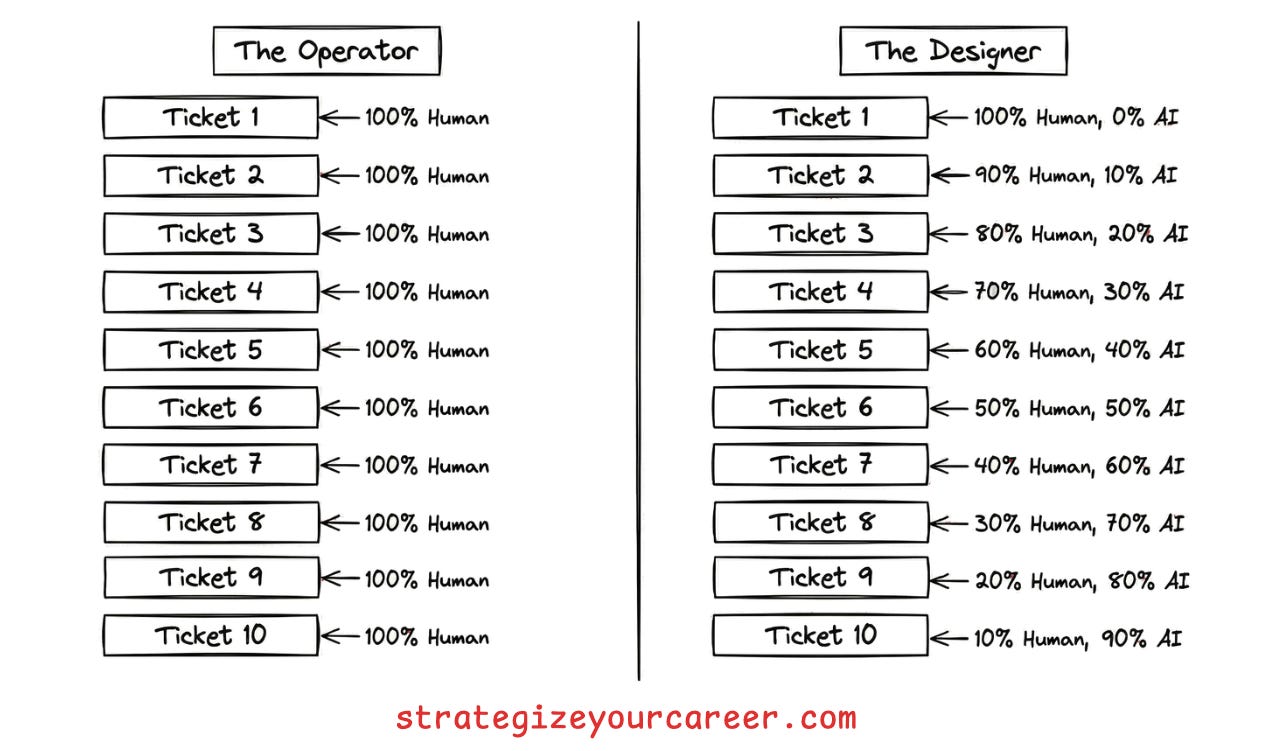
They are operators, not designers. They spend their days copy-pasting context, refining prompts, and reviewing code line by line. This approach hits a ceiling quickly. You can only type so fast. This is not so different from the era of pasting the code snippets to an AI chat in a web browser and copying back the results to code. We have now AI in the IDE and terminal, but we keep using it in the same way.
The real goal is moving from manual prompts to a fully autonomous companion agent that runs in the background.
My journey, like most people who automate anything, started with frustration. I was manually fixing boring tickets and operating the system. I realized I needed to shift my role. Instead of being the one doing the work, I had to design the systems that do the work. But of course, my manager expected the work to get done, so I couldn’t ask for a week or two to automate things and do no other work.
I built a team of agents, including a TPM triaging tickets and pinging for more information, a Developer implementing them, and a Reviewer addressing the comments humans leave. This literally is saving my team the capacity of more than 1 engineer from doing trivial but tedious changes that, before, were distributed among everyone to make it bearable.
After seeing the results, I realized it’s not only applicable for trivial changes, but to any part of your workflow.
In this post, you’ll learn
The 10-step process to move from manual prompting to fully autonomous agents
How to use MCP servers and how not to use them
When you need more than one agent.
How to define your role as the human in the loop
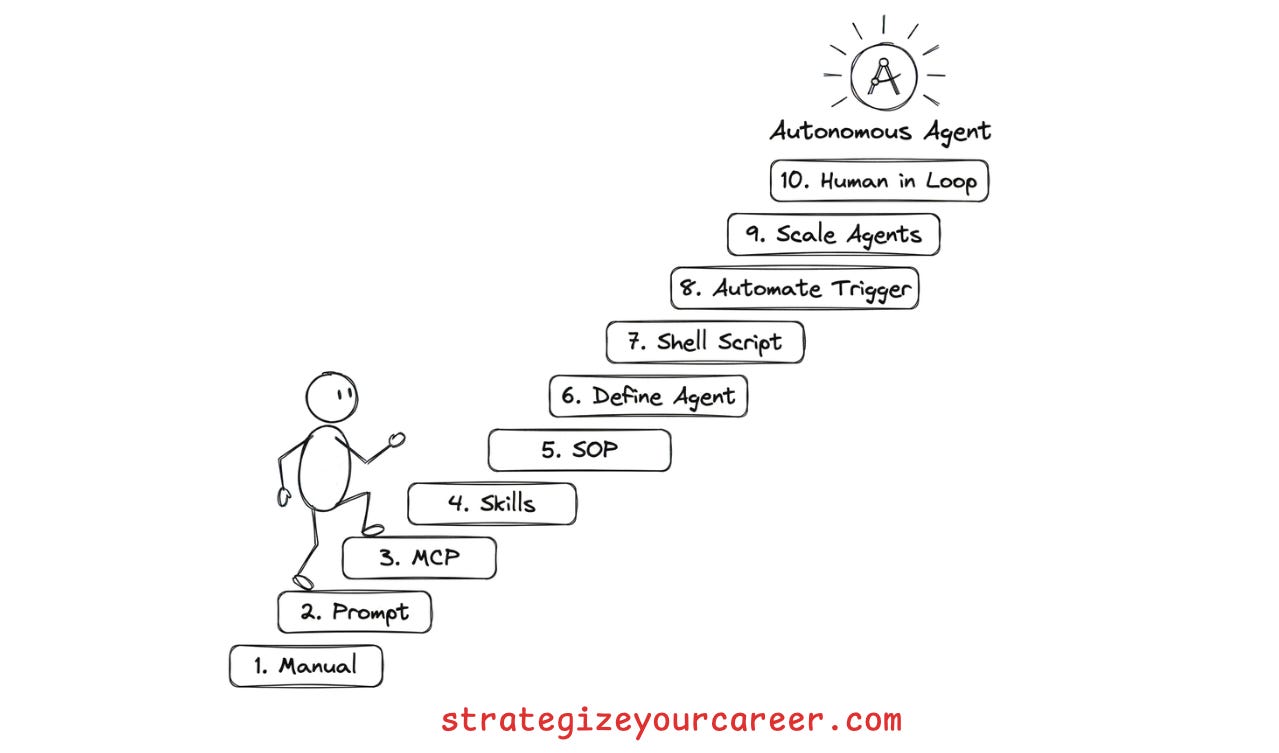
The process
The best way I found to do this process is to do the work multiple times. If you want to automate a particular type of ticket your team executes, ask your team to let you handle all those tickets for a while so you can develop the automation.
If you’re jumping too much between roles, you won’t have enough time and tickets to automate them properly. I warn you, the first steps you’ll spend 2x or 3x the time you’d spend if you did this manually, like you already know. But this is an automation that will run forever, including when you’re sleeping. It’s worth the cost
1. Learn the manual process first
You cannot automate what you cannot describe. This is the most common mistake engineers make. They try to build an agent for a task they do not fully understand themselves. The result is a flaky script that fails on most edge cases.
Do the task yourself without AI once. Write down every decision point. If you cannot write a checklist for it, the AI will fail. You need to identify the inputs, the decision logic, and the expected outputs. This manual pass reveals the hidden complexity that you usually handle on autopilot.
Of course, start with happy paths, don’t start with the most complex edge case for this kind of work. You can enrich the automation you’re building with edge cases later.
2. Solve it with manual AI prompts
Prove the concept before building the system. Once you understand the process, execute the task using manual prompts in your chat window. Do not try to build a complex agent yet. Just use your chat client.
Keep delivering work for your team, but refine the prompt with each ticket. You are identifying where the agent hallucinates or misses context, and updating your prompt for the next ticket. You will find that the agent often fails because it lacks information you thought was obvious. Refining the prompt manually allows you to fix these gaps quickly, and you’ll realize where AI by itself can’t solve the problem.
For my use case, the hardest part was about AI not being able to read, parse, understand and take action on complex JSON files. Also, I kept doing many manual work, posting comments in JIRA tickets, and moving between states in a kanban board.
3. Plug in MCP servers
Stop copy-pasting data between your browser and your IDE. The biggest friction point in manual prompting is context switching. You act as the glue between your ticket tracker, your code repository, and the LLM.
Connect MCP tools (the MCP standard) that allow the AI to take actions you were doing in the browser. You can use MCP servers to update JIRA tickets or comment on GitHub issues.
Now, all execution can happen inside your terminal or IDE. The agent can now fetch the ticket description directly. It can also post its findings back to the ticket without your help.
4. Create agent skills for repeated prompts
Don’t re-prompt the same context every time. After 2-3 iterations on tickets for the same kind of changes, you will notice that you are pasting the same instructions over and over. This is inefficient and error-prone. AI is great at planning but bad at reading ten thousand lines of logs.
I used to keep a prompt library with the prompts that I used for each kind of task. It was a good way to keep improving the prompt and have the benefits of iterations and a feedback loop. The problem was that again, I was the bottleneck, copy-pasting between one window and another.
Write specific skills (the skills.md standard) that allow the AI to do what the prompt describes. For the things that AI can’t do well enough by itself, create scripts to take complex, deterministic actions.. You do not need a fancy MCP tool for everything. A simple bash script wrapped as a skill works wonders. I used this to
In essence, a skill is
Something the AI learns to do.
It contains knowledge (markdown files), scripts to take actions (e.g. python or bash scripts), and resources or assets it can reference.
You can wrap MCP tools and scripts as skills. They enrich the MCP tool or script with context regarding how to use it. Even if the AI can execute commands in a terminal, it’s better to give it the building blocks with scripts than to let the AI generate those on every execution
My example with the JSON files:
ADD.py
FIND.py
REMOVE.py
My example of handling JIRA tickets:
SKILL.md and other markdown files -> Contains instructions to use JIRA MCP tools, regarding the status transitions in my workflows, regarding the projects and boards to use, etc.
5. Orchestrate with an agent SOP
Skills are the tools, but the SOP is the orchestrator. If you execute another ticket with all the building blocks we have added, you’d find yourself orchestrating skills (skills are those slash comamnds /my-skill )
My work at this point was queuing prompts like this:
/Git-management Create a new branch for the ticket JIRA-1234
/Jira-management Read JIRA-1234
/Implementation Implement the changes and run the build to verify nothing breaks
/Git-management Commit the changes
/Github-management Create a PR and publish it
/Jira-management paste the PR link in a comment and move the Jira ticket to code review
You have a collection of skills, scripts, tools, and prompts. Now you need to define the order of operations. Create a standard operating procedure that tells the agent when to use each skill.
This connects back to step two. Your manual process is now modeled as a bunch of skills to execute in order. You define the triggers and the expected outcomes for each step. You moved from operating the system to being an orchestrator, but you’re still the bottleneck orchestrating these tools.
An agent-sop is a concept that is used at Amazon (link), but you just need to create a skill that describes this series of steps, and reference the skills, MCP tools, scripts, and/or prompts. As easy as that, you can model it all with Agent skills.
6. Define the AI agent
Bundle the SOP, skills, and tools into a single entity. You have all the components. Now you need to package them. Most tools like kiro-cli or cursor allow you to define a persistent agent configuration.
Now you don’t even need to ensure the MCp tools are available and the files with skills and prompts are accessible. A single entity now loads your entire context and toolkit. You can launch your specialized agent with a simple command. This sets the system prompt and loads the necessary tools. The agent is now ready to work with the specific context and rules you have defined.
For example, the Agent to implement a JIRA ticket is clearly an “implementation” or “developer” agent.
Now the only prompt I had to send was:
“/implementation-agent-sop Implement JIRA-1234”
7. Put the agent into a shell script
By the time I reached this point, I was already doing tickets like crazy. I was running the agent-sop as a skill in my IDE, and I was executing the tickets and raising PRs super fast. The code review queue of my team was flooded with me making all the changes we had in our intake backlog.
So now I can execute an entire ticket end-to-end from JIRA to raising the PR. But I was still the bottleneck. I had to choose the Jira ticket ID and go to my IDE to execute it. Now we want to remove this interaction. Instead of having to manually start the agent for each task, write a shell script that checks for work.
The script should query your ticket tracker for new items. If work exists, it executes the agent. If no work exists, it sleeps. This simple loop transforms your agent from a tool you use to a worker that runs on its own.
This is a technique called the Ralph Wiggum loop, after this famous post. They used the Ralph loop within a single task as a way to do some hard work, post the outcomes, and next steps, then start the agent again with a clean context window.
I was doing simple enough changes to have a single context window for all the changes, but I wanted to have a new and fresh context window for each JIRA ticket.
In essence, you just need to decide
Where it reads from
Where it writes to
Then put the agent into a shell script.
As easy as that.
It’s up to you to decide if it reads from the previous execution of this same AI agent, from the previous execution of another AI agent, or from human input in a JIRA ticket.
8. Automate the trigger
We’ve done a great job. Now the execution is going on autopilot. But any software engineer feels uneasy with the sleep command we’ve put into the bash script. Also, we are still the bottleneck in a way. We have to execute the script if we stop it at the end of the day (some people leave the processes running overnight)
I decided to remove myself from the start button. Replace the manual script run and the sleep loop with a cron job. The agent runs periodically, checking for work and executing it without your input.
This is where the magic happens. You come into work and find that the agent has already triaged new tickets because it was scheduled to run. It has already drafted pull requests for simple tasks. You are no longer the bottleneck. The system works for you.
Products like ChatGPT Pulse and the rise of Clawdbot were about scheduling cron jobs to run a CLI like Claude code with a specific prompt. When I realized this, I thought, “Wow, how didn’t I think about this earlier?”
9. Scale to multiple agents
One agent cannot do everything well. As you add more capabilities, the context gets polluted. The agent becomes confused and less reliable. Create specialized agents with clear hand-offs.
The job of my automation wasn’t only to implement JIRA tickets, but to ask for more information on the incomplete ones. Some tickets are not even something a human could implement. They’d need someone to take a look, to ask for missing information, and focus on something else until someone responded.
So I wrote a triage agent that checks the entire backlog ready for triage, and outputs a ready status or requests more info. Then the dev agent only picks up the ready items and outputs a pull request. Then a review agent picks up the comments people leave in my PR, addresses them, and sends a new PR revision.
Each agent does one thing well. They pass work to each other like a factory line. They have well-established ownerships:
They read inputs from one source,
do their piece of the job,
and write outputs to another place.
They run autonomously with little work from my end.
10. Define the role of the human in the loop
The main problem was that I saw peers doing these tickets and spending days asking for more information, executing the trivial but tedious changes, raising the PRs, reviewing, addressing comments...
But what if all the human involvement from the engineers in the team is just reviewing the PR and adding comments for the agent to address on its own? We just need to approve when it’s good enough, and that’s the only thing we’ve done.
All my work here, automating this type of intake ticket, was about pushing the human to the right as much as possible, but not about removing the human.
Human is in the loop. You are not replaced. Your role shifts to high-level supervision. You can take human actions at any stage of the process.
The triage agent grooms tickets, but you enrich ambiguous requirements.
A researcher agent finds alternatives, but you make the final decision on the approach.
The dev agent writes code, but you review the implementation plan before a single line is written.
The code reviewer highlights risks, but you leave architectural comments.
The fixer applies changes, but you ensure the fix addresses the root cause instead of just patching it.
Another example: The marketing workflow
You can apply this to any domains. A marketing workflow could have:
A strategist agent that drafts the brief, while you act as the visionary, providing the emotional hook.
A copywriter agent generates variations, and you act as editor-in-chief, checking voice and tone.
A visual agent creates assets, and you act as art director, checking the vibe and providing comments.
A media buyer agent manages bids, and you act as risk manager, setting the hard spend ceiling.
A brand guardian agent scans for compliance, and you act as the legal sign-off.
Conclusion
You are building a system where you are the manager and the agents are your staff. You design the system so that each gear of the engine moves smoothly,
You define the work to do, and review the work done, but you’re no longer doing the work.
Exactly, just like a manager, except for the fact that you must micromanage the AI to teach the step-by-step until it learns... oh wait, like many managers 😛
Start with step one today. Pick one task and write the manual process down. Do not try to build the whole system at once. Iterate through the steps and build your companion agent one skill at a time.
By the way, your team will be more than happy that you ask to do all the tedious tasks of a kind for a while until they are fully automated.
If you found value in this post:
❤️ Click the heart to help others find it.
✉️ Subscribe to get the next one in your inbox.
💬 Leave a comment with your biggest takeaway
This is an article inside our system between phases 1 and 2. You’ll do your job faster with AI tools, freeing up the time to do the important things that drive your career forward.
I’m building this system for paid subscribers. Thanks for your continued support!
🗞️ Other articles people like
👏 Weekly Applause
Hungry Minds by Alexandre Zajac to find good content to read.
The Role of Caching at Netflix by Saurabh Dashora. Netflix’s use of EVCache proves that a robust in-memory layer isn’t just for speeding up reads; it can serve as a primary data store.
I struggled to code with AI until I learned this workflow by Neo Kim. Stop treating AI like a magic vending machine. The real productivity gains come from an iterative loop. A good read after reading my article
P.S. This may interest you:
Are you in doubt whether the paid version of the newsletter is for you? Discover the benefits here
Could you take one minute to answer a quick, anonymous survey to make me improve this newsletter? Take the survey here
Are you a brand looking to advertise to engaged engineers and leaders? Book your slot now
Give a like ❤️ to this post if you found it useful, and share it with a friend to get referral rewards
The fancy images are likely AI-generated, the not-so-fancy ones by me :)


Wow! This is so practical and I’m excited to try all the use cases I have in mind 🤩