

I built my first AI agent to write code and send 100+ PRs/month at Amazon. That part worked great, it was sending PRs automatically. But for the rest of my work, I was still alt-tabbing every few minutes out of my to-do list to add a task, check what was due, or reschedule something that slipped.
That’s when something clicked. We used task-management apps when humans were executing tasks, but now we are delegating to agents. We need the same with AI agents. We need the agent to be the interface of a task management system.
Get the free AI Agent Building Blocks ebook when you subscribe:
Now I never open an app anymore. I say, “Add this task, due Friday,” and the agent handles it. I say, “What do I have today?” and I get an answer in three seconds. No app. No clicking. No context-switching.
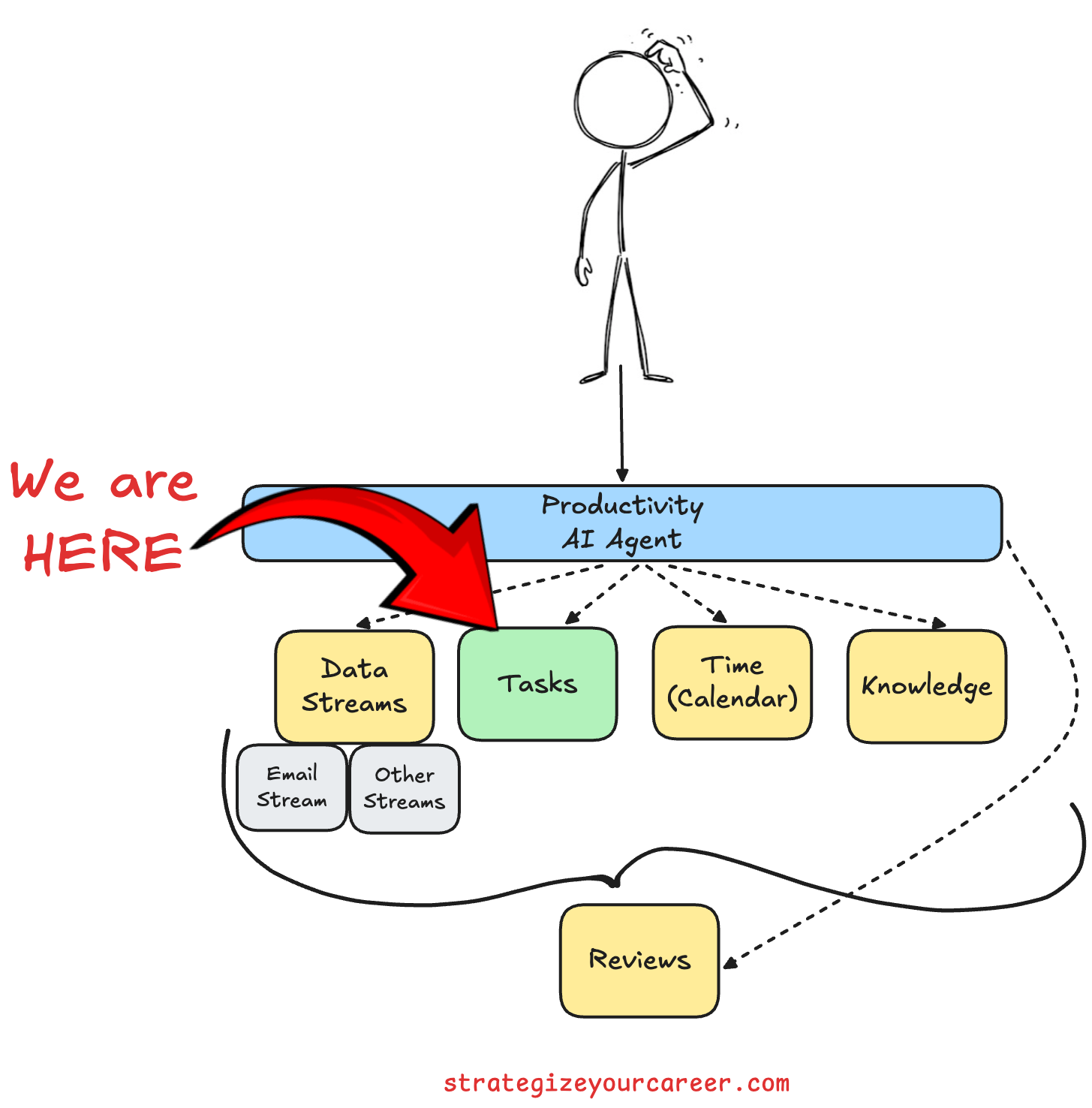
That’s what this post is about. This is Post 1 in a series on building an AI productivity agent, and I’m starting with task management for a good reason: tasks are the highest-frequency productivity action you take every day. It’s a low effort, high-reward situation. Once it’s working, you feel the shift right away.
Here’s what comes next in the series:
Post 2: Calendar: adding a calendar and building the morning briefing from this post combines tasks and events in one message.
Post 3: Notes: conversational save and retrieve your knowledge with a notes backend.
Post 4: Email: manage your most important information stream, the email.
Post 5: Quick Capture & Review Day automation: Make this agent an extension of your brain and create a tight feedback loop with weekly reviews.
In this post, you’ll learn:
Why task systems fail (and why it’s not a discipline problem)
What makes a task system actually work for an agent-driven workflow
How the daily briefing replaces your morning app routine
Why Beads is the right backend for an agent, and how to install it
How to wire a skill file on top so the agent behaves like a real productivity partner
Why Task Systems Break (And It’s Not Your Fault)
There are three reasons task systems fail. None of them is about willpower.
The first is not trusting the system 100%.
You put some tasks in the app. You try to hold others in your head. You write a few on a sticky note on your monitor. This seems fine for a while. But partial trust equals no trust. Your brain is never fully offloaded to the system because it knows the system isn’t complete. Eventually, you stop using it.
The fix isn’t discipline. It’s reducing friction to zero. If adding a task takes ten seconds and many fields to fill, you’ll skip it. If it takes three seconds, you’ll capture everything.
The second is data getting stale.
Tasks pile up unchecked. You update something in your head, but never reflect it in the system. One day, you look at your task list and realize it’s fiction. It stopped being a real picture of your life weeks ago. This kills trust immediately and sends you right back to problem one.
Maintenance is the fix for this. But here’s the thing: nobody likes maintenance. It’s boring, and it adds friction. That’s fine, because now the agent does it.
The third is getting overwhelmed.
You open Todoist, you see 60 tasks staring at you, and analysis paralysis hits. You close the app and go check Twitter. This isn’t weakness. It’s a system design problem. The master list is not the right thing to look at. What you need is a daily list.
The common thread across all three failure modes is the same: friction and maintenance. These were human problems. Now they’re agent problems.
I wrote a bit more about how AI is increasing decision fatigue for software engineers in this article:

What an Agent-Driven Task System Needs
Those three failure modes map cleanly to what an agent needs to do its job. There are three non-negotiable properties.
Zero friction to add tasks.
Every extra click is a task that never gets captured. An agent conversation takes three seconds: “Add buy milk, tonight.” Compare that to unlocking your phone, finding the app, tapping add, typing the task, setting the date, and confirming. That flow is seven steps. Three seconds versus thirty. You’ll capture far more in three seconds.
The agent can add a task itself even when you’re not asking for adding a task explicitly. This is the first article of a wider productivity agent, so this will make sense once the agent is completed.
Organized by context, not chaos.
Work tasks, personal tasks, and grocery lists cannot live in one flat list. You need projects and sections. The agent needs to know where to route things. “Add this to the Work project” is a complete instruction. Without structure, the whole system collapses into noise.
Views that match how you actually think. “
What do I have today?” The agent answers this without you opening anything. “What’s coming up this week?” Same. “Do I have anything due before Thursday?” Now that’s a query no app UI does well. But an agent runs it in one command and gives you the answer in plain English.
The AI Daily Briefing: Replace Your Morning App Routine
A hack for the overwhelm problem is a daily task list. Every morning, you’d write down only what he needed to do that day, either in a notebook or a quick note in any app. Then you’d work from that, not the backlog with all the tasks. The master list is for planning. The daily list is for doing.
I wrote about my 5-minute habit to follow this approach and roll up all my daily actions to the goals of my quarter in this article:

With an agent, you don’t even need to write the daily list. You ask for it.
“Give me today’s briefing” returns your tasks due today, filtered by priority. P0 items first, then P1, then P2. Grouped by project so you can see what’s work and what’s personal. No scrolling. No decision fatigue. No staring at 60 items, wondering where to start.
You never see the full master list unless you ask for it. The agent surfaces only what matters right now. This is the same principle I was using in my spreadsheet checklist, except the agent generates it automatically every morning before you’ve had your coffee.
The compound effect gets even better when you add a calendar, which is coming in Post 2 of this series. One query will surface both tasks and meetings. You’ll get a full morning briefing in one message: what’s on your plate, what’s on your calendar, and what to tackle first. But that starts here, with tasks.
Continuing below, we’ll see the step-by-step setup of Beads for the local task backend, wiring it to Claude Code (or Codex or any other agentic tool) with hooks and a skill file, the exact natural language commands your agent will understand, and a downloadable SKILL.md you can drop in your agent and use today.