

Get the free AI Agent Building Blocks ebook when you subscribe:
I think we all accept that AI tools like Copilot, Cursor, or ChatGPT make software engineers faster. The premise is simple: you type a prompt, the machine writes the boilerplate, and you ship features in a faster time.
However, AI code generation is killing deep work. This speed creates a paradoxical fragmentation in our workdays. While the code generation itself is fast, the human side of the equation is breaking down due to small waits, and those waits are destroying engineer productivity in 2026.
Waiting for an IDE to generate code creates dozens of micro pauses throughout the day. These pauses are dangerous because they invite distractions like Slack, email, or social media. I have faced this challenge at work, where I check Slack while AI generates. Since using AI in your IDE, your days have become more fragmented, and that’s a risk for your productivity.
In this post, you’ll learn
Why the 5 to 30-second “dead zone” is the most dangerous productivity risk for software engineers using AI code generation.
The psychological reason your brain craves distraction during AI latency.
How context switching destroys your ability to audit AI-generated code quality.
An actionable “AI Detox” protocol to maintain deep work and flow state while using LLMs.
Why AI Kills Engineer Productivity in 2026
The biggest barrier for engineer productivity in 2026 is not the quality of the AI model. It’s how you manage your attention during the seconds your IDE is thinking.
Being a productive engineer is about impact, not the volume of lines produced. It depends on sustained deep work and architectural thinking: learning faster, being reliable in code reviews, and developing good intuition about your systems.
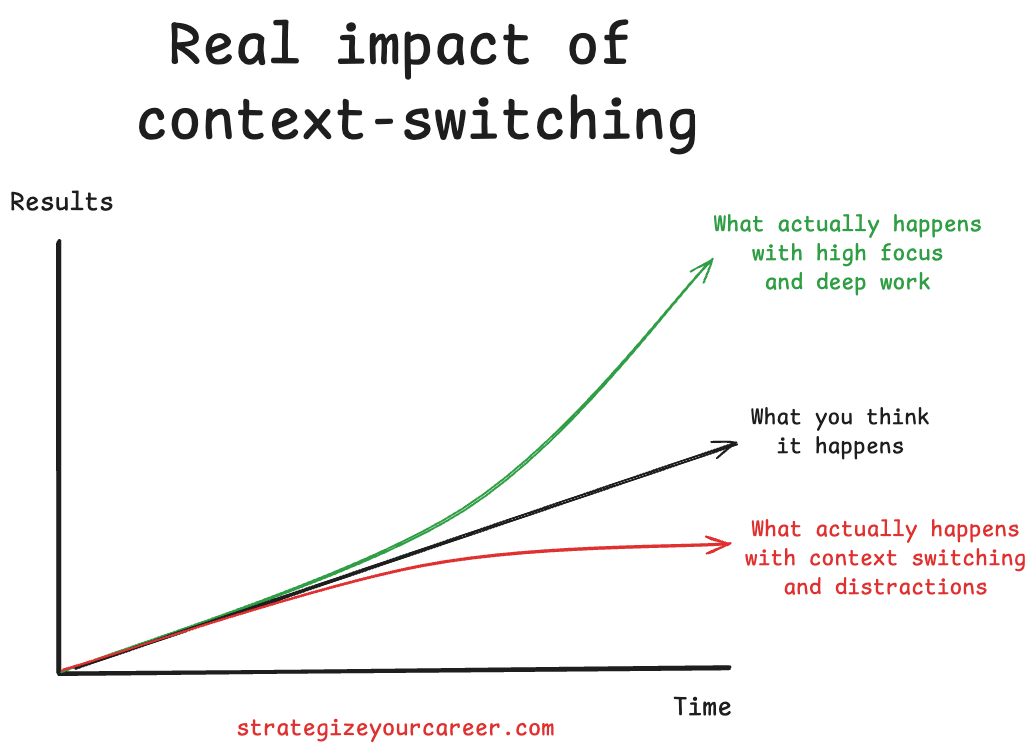
AI code generation tools like Copilot, Cursor, and Claude Code have changed how we write software. But they’ve also introduced a new productivity trap: micro-waits that fragment your focus dozens of times per day. Each 5-30 second pause invites a tab switch. Each tab switch costs minutes of recovery. Multiply that across a full workday, and you’re losing hours of deep work to seconds of distraction.
This article breaks down the problem and gives you a concrete protocol to fix it.
The AI Code Generation Dead Zone: Why 5-30 Seconds Destroys Your Focus
We must define the specific time windows that affect our focus.
< 1 Second: Instant gratification. Keeps focus unbroken.
> 1+ Minute: Conscious break (coffee, stretch). Low cognitive cost.
5–15 Seconds (The Trap): It is too short to do real work or take a break, but long enough for the brain to crave a dopamine hit.
The psychology behind this is the static spinner (or Generating... text) in the IDE. This passive visual cue signals that there is nothing to do here. It gives your brain permission to disconnect. The brain treats this latency as a free pass to check communication channels.
I took some days off from work for Christmas, but I was still doing some coding on my personal laptop. I found I was tempted to switch tabs to Slack, like at work, only to find out I don’t have it installed on this laptop. This proved that the impulse is a behavioral habit rather than a necessity. And I decided to take action on it.
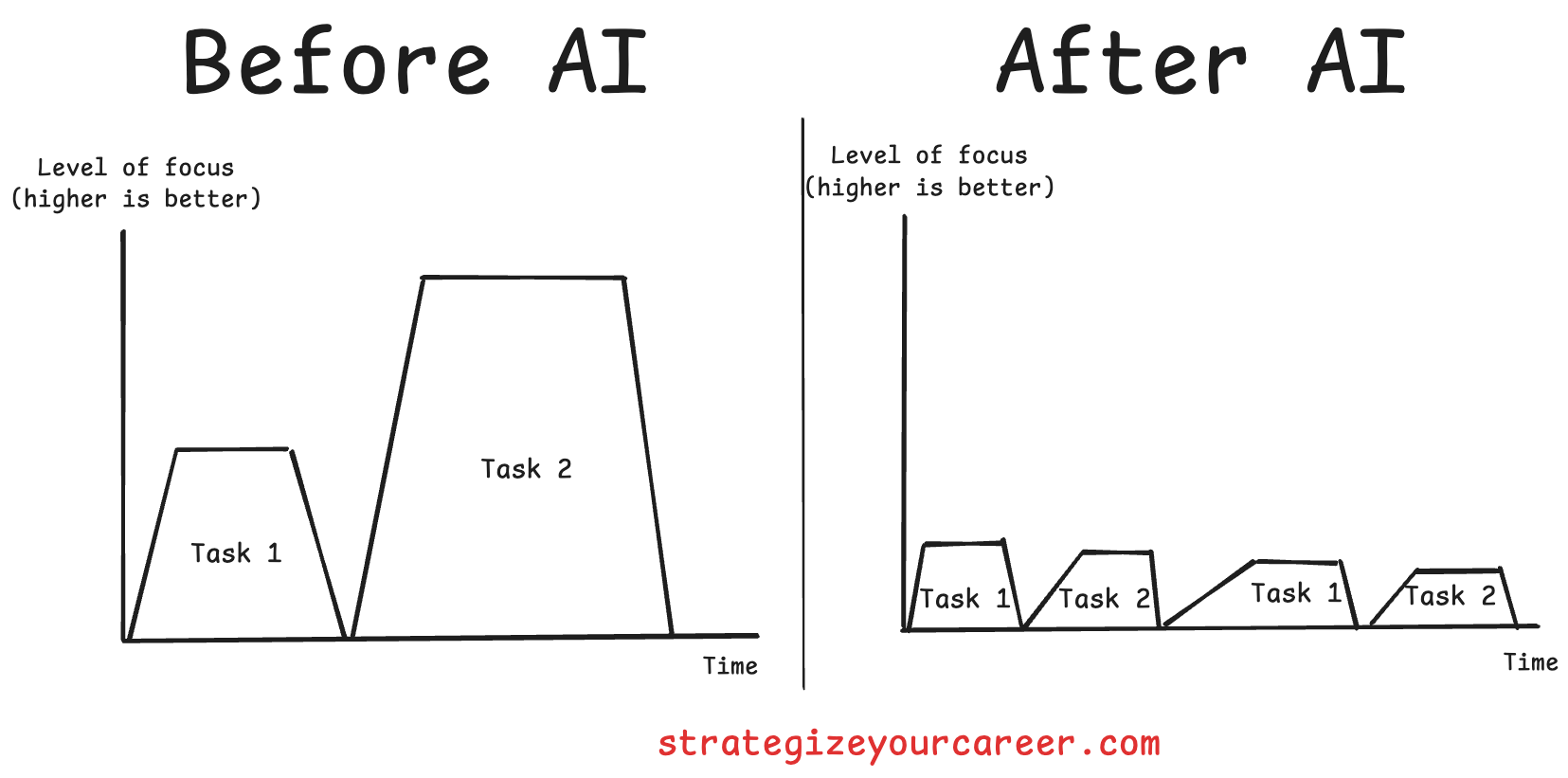
Many engineers fall for the false multitasking myth. They believe they can quickly check a message in 10 seconds. In reality, reading a message loads a completely new context. The return cost is high because switching back requires reloading the code context into working memory. This reloading process often takes longer than the original wait time. It’s like a plane: it takes a lot of energy and time to take off and land, but once it’s “in the zone”, it travels faster. Every time you switch contexts and switch back to the IDE, you have to “take off your task” again.
The Hidden Cost of Context Switching While AI Generates Code
I find the most interesting outcome of tab-switching is mental detachment. When you tab away, you mentally detach from the problem and place the responsibility of the code entirely on the AI. When you return, you are less likely to rigorously audit the AI-generated code. You accept that it looks like it works because re-engaging deep critical thinking feels too heavy after a distraction. More and more often, I find myself and others answering in PR comments: “Oh, that was my AI doing it”.
We must distinguish between types of context switching. Multitasking is switching to another context further from the primary one, like checking a Slack message on another project. Updating code in one file and the test in another is not really multitasking because you are still in the code context and the same project/task context. However, switching to Slack or email is a disaster; any context could come from out there. The cumulative effect of hundreds of these micro-switches leads to more decision fatigue. I don’t know about you, but since the use of AI, I’m feeling more mentally drained after work. More things are happening at the same time.
How Senior Engineers Already Solve This Problem (Without AI)
Imagine you’re a senior engineer who just got assigned a junior engineer who has just finished the company onboarding and is ready to pick their first task. You need to give some work to this engineer. You can’t trust their output blindly, but you can’t take over and do it yourself.
What are you doing in those situations? Probably some of these:
Define the context very well upfront → Spend more time writing a better prompt or spec
Limit scope to reduce their cognitive load → Break down into small prompts with a single responsibility, chaining them after the previous one is completed
Implement frequent check-ins → Don’t wait 2 hours until code is deployed, only to find out it’s wrong. Ask AI to provide an implementation plan and review it, and ask AI to ask any questions that aren’t clear
Use static analysis/linters to reduce nitpick feedback → Use static analysis/linters to reduce the things you have to add to prompts/rules loaded
Spot patterns, not instances. This may trigger you to update onboarding or frame things in another way -> Spot the failure patterns of your AI to update the context rules or the way you put your prompts
With AI, we aren’t doing anything new. The difference is that it’s a machine, and everyone is hyped, so we treat it as new, unresolved problems. Look back in time to find how similar problems were resolved successfully. There’s a higher chance of success coming up with new things.
The AI Detox Protocol: How to Maintain Deep Work While Using AI Coding Tools
The first step is the hands-off rule. When you hit “generate” in your IDE, physically remove your hands from the keyboard and decide consciously what you’ll do next. The goal is to break the muscle memory of hitting Cmd+Tab. You should only leave the “IDE context” if you leave things running in the background for an intentional break, like getting coffee. Otherwise, stay in the IDE.
Remove low-friction escapes to succeed. Close Slack so you cannot switch tabs into it. Rename it or put it under a different folder so you cannot access it fast, only intentionally. Block social sites on work machines so that distraction requires intent rather than reflex. We’ll replace this switch with active waiting.
Read the thought process of the LLM or plan your next prompts.
Queue the next prompts in your IDE while the current one runs.
Review the code changes from the LLM as they are generated
Review the previous code output while the next one is getting generated (chaining prompts)
We can apply the Atomic Habits framework to this problem:
Cue: The trigger that initiates a behavior. It predicts a reward.
Example: A phone notification
Craving: This is the motivational force behind the habit. You don’t crave the habit itself, but the reward it brings.
Example: Curiosity/social connection to know who messaged you and what they said.
Response: This is the actual action.
Example: You pick up the phone and read the text.
Reward: The end goal of every habit. It satisfies the craving and teaches your brain to remember this action for the future.
Example: You satisfy your curiosity and feel connected to the sender.
Going back to our IDE:
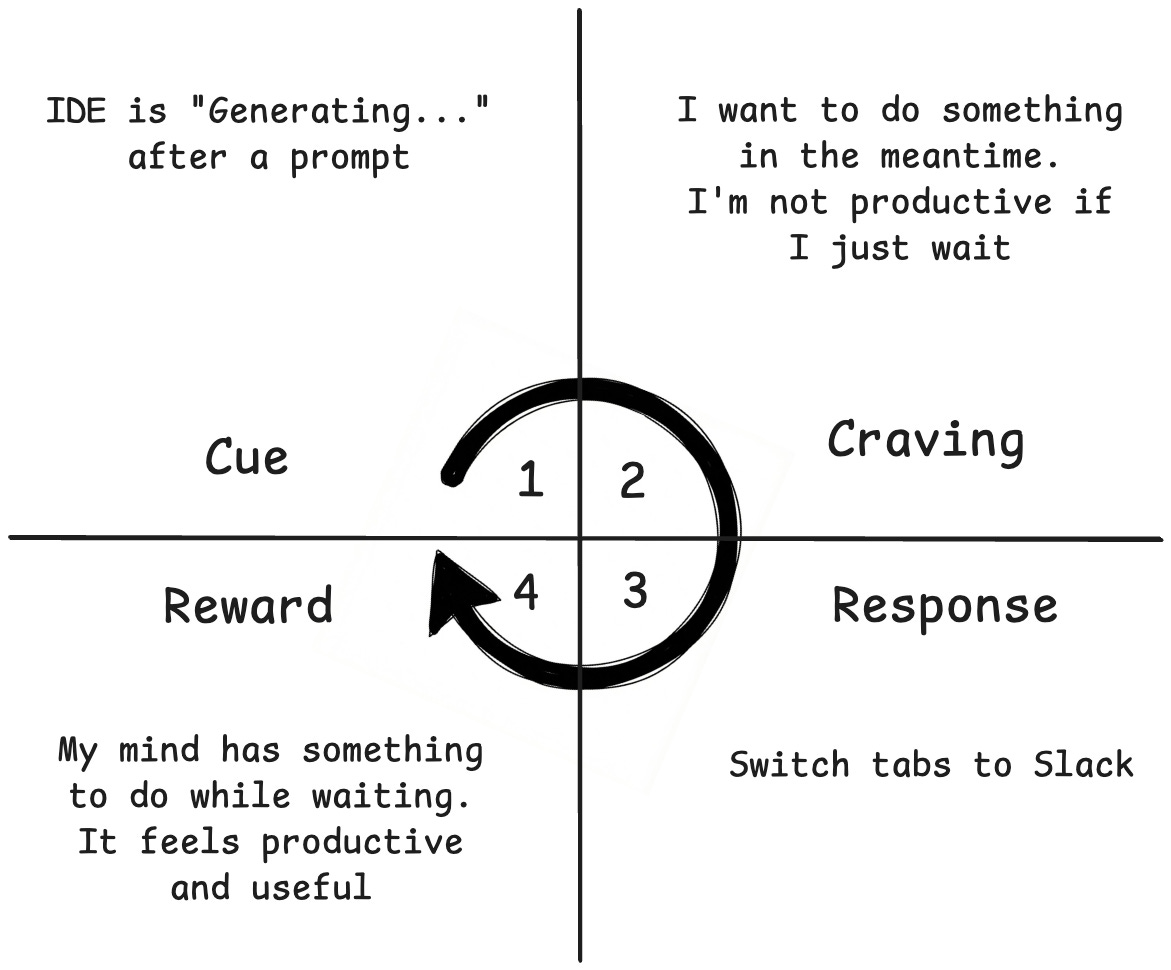
The cue is the wait time after prompt submission, the “Generating...” message.
The craving is to do something in the middle to keep your brain active.
We’ll change the response from checking Slack to reading the chain of thought of the AI model.
The reward is that your mind has something to do while the IDE is generating, and you do not switch contexts.
Besides changing the response to something better, we can also remove the cue. It’s better to reframe it, or you’d fall again into the old habit, and I wouldn’t go back into coding without AI. But we can reduce the amount of wait time by optimizing our AI model stack:
Slow thinking models to generate an implementation plan or brainstorm the feature. Claude Opus Models, Gemini 3 Pro / GPT 5.2 with “high” reasoning, etc
Fast models to execute. Gemini 3 flash is a beast, as it has almost the same intelligence as bigger models, but it is much faster. Composer by Cursor is also fast and does the job.
When Context Switching Is Acceptable (And How to Do It Right)
There are specific scenarios where switching is acceptable, provided it follows a long switch. If the prompt involves a massive refactor or a multi-step iteration taking 15 minutes or more, you shouldn’t sit idle or watch AI work on something trivial but long.
Let’s say I have queued a few prompts to: