My code was AI Slop until I learned this system
Stop being overwhelmed by tickets. Scale your output and fix messy AI workflows with the three loops: inner execution, middle state, and outer architecture.
We are now 21k readers! 🎉🎉 Thank YOU for supporting this newsletter!
You can now get my system design template for FREE when signing up for the newsletter.
It’s the best resource I have for the outer loop, explained in this post. Keep reading for more!
A developer sat at their desk staring at a mountain of unresolved tickets.
This developer knew how to write clean functions and build solid features. They were the top code contributors of the team.
But despite their technical skills, they felt completely overwhelmed by the sheer volume of work. Raw coding speed was not enough to keep up.
The role of a software engineer has been changing lately. Having basic programming knowledge is necessary, but not sufficient.
Now we have to learn productivity and workflows with AI to scale our output. Developers who lack organizational skills quickly fall behind in this new environment.
Real productivity means understanding your feedback loops. You must keep them tight. You must also close them
Let us look at how to apply these concepts in daily practice.

In this post, you’ll learn
How to speed up coding tasks using the inner loop.
How to manage project states and handoffs with the middle loop.
How to plan software architecture using the outer loop.
How to position yourself as an internal AI leader.
The three loops of AI productivity
AI isn’t just a fast code generator. It’s the brain behind our new productivity system. To leverage it effectively, we need to understand the three loops of AI productivity.
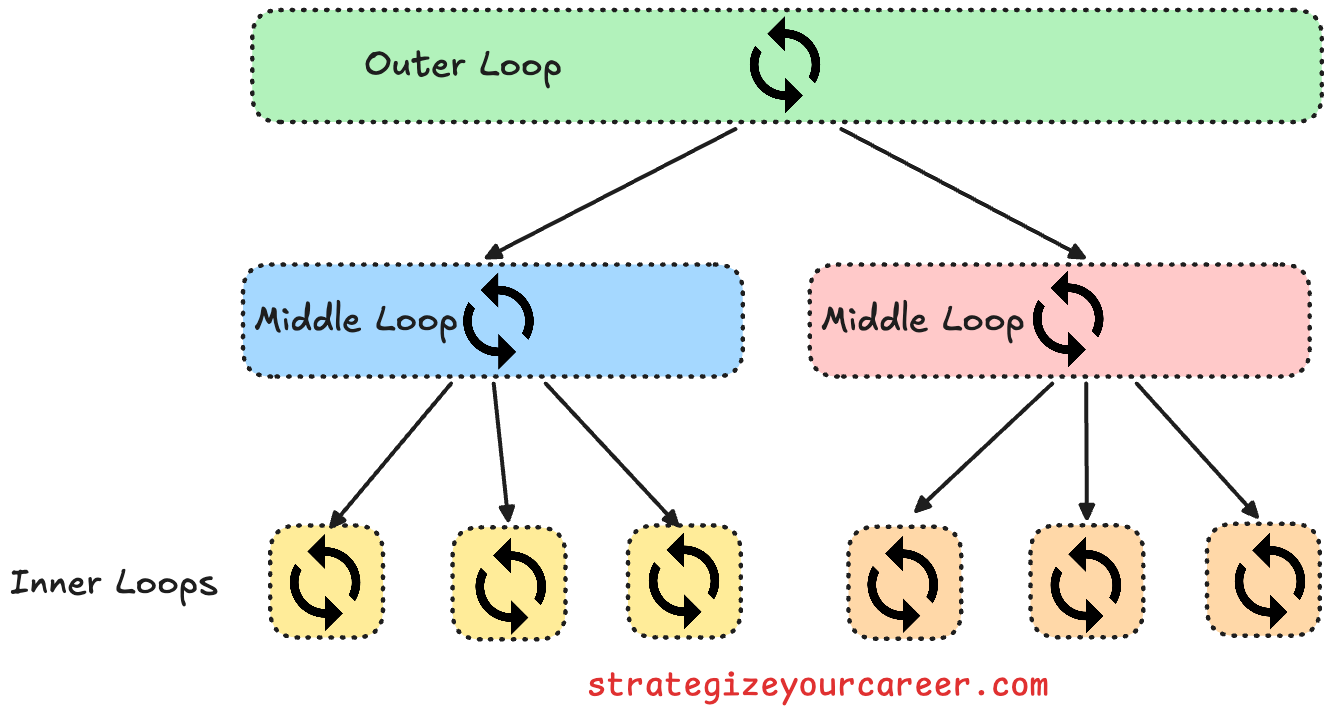
We’ll call them the inner loop, the middle loop, and the outer loop. These are the names that Steve Yegge and Gene Kim used in their book Vibe Coding
The inner loop is where a developer and AI rapidly exchange ideas and code in minutes. Treat it like a chef managing orders by focusing on tiny tasks.
The middle loop manages projects and task handoffs. This phase spans hours to days and involves the systems needed to pick up where work was left off. It’s like how chefs prepare ingredients before service and clean up after.
The outer loop thinks in the long term. The chef moves focus from cooking individual dishes to weeks or months of menu planning and kitchen improvement.
While reading, you may have imagined systems for all of these 3 loops
Inner loop: A developer using their IDE and executing unit tests
Middle loop: A kanban board with all the tasks and dependencies for a project
Outer loop: Documentation of architectural patterns and API contracts between services.
We’ll see how to adapt the three loops to AI
The inner loop for fast execution
Keeping AI interactions tight and focused maintains momentum.
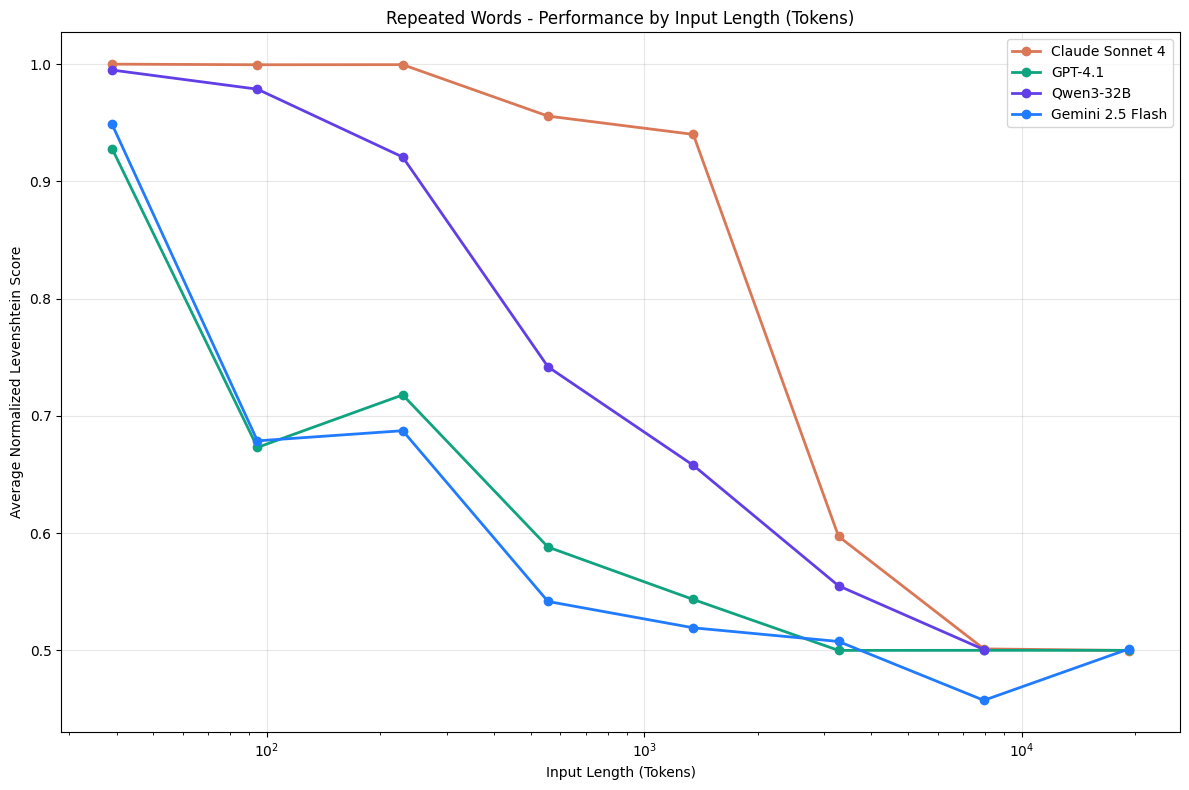
LLMs have a decay curve where the quality of output degrades as the conversation goes on. Writing micro prompts that target one specific function or bug fix at a time keeps the inner loop tight.
A few months ago, I’d have told you to build a personal library of prompts for common tasks like unit tests.
Now we don’t need to micromanage AI anymore.
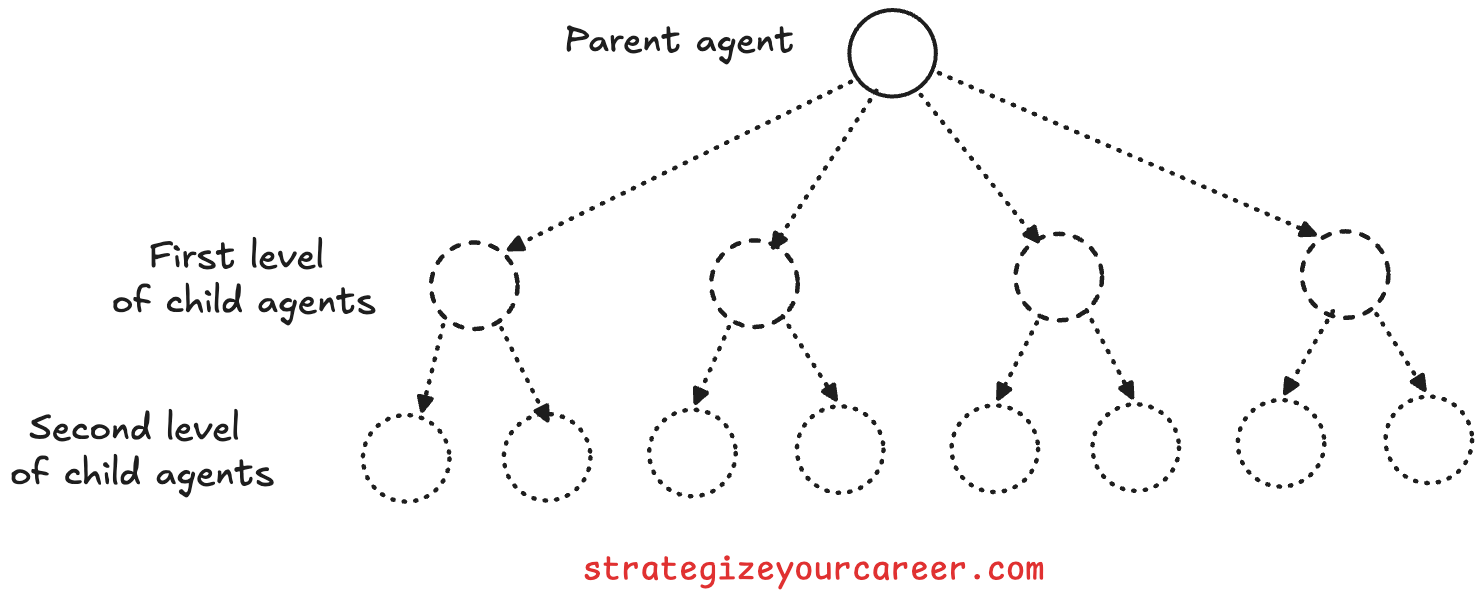
We can put a series of steps in an Agent Skill. We’ll avoid the context rot by creating a simple multi-agent architecture where the main agent can spawn child agents.
Parent agents manage the work. Child agents do specific tasks. One child might write tests. Another might refactor code. A third could write documentation. This keeps the inner loop focused.
In this loop, the tools that matter the most are version control and unit tests.
You need to save the progress through commits, to have a separate branch for the agent to work on a particular task
You need to have unit tests to validate that the agent doesn’t break other functionality.
One of the problems with the inner loop is that the agent has a very narrow goal.
Tell an AI to make an API return a value. It might remove other data by mistake. It might also return fake data instead of using the database.
That’s why we need the middle loop
The middle loop for orchestration
Some time ago, every new session with the AI was a brand new start.
We needed a system to manage the state of the project and the handoffs between sessions. This is where the middle loop comes in.
Large tasks can fill your context window. This causes API errors. Some tools fix this for you, but you can also manage it yourself. Ask the AI to summarize your progress. Include the next steps. Save this summary for your next session.
We have to do the same between tasks.
Tasks
For example, if you have a project with 10 tasks, you need to have a system to manage them and their dependencies.
In this loop, we want to reduce the amount of data gluing we have to do between tools.
Use tools like Jira for team projects. Connect your AI to them and treat it as the source of truth.
I prefer a different way when working alone. People like Peter Steinberger, the creator of OpenClaw, and Steve Yegge follow this approach. AI can act as your task manager with a CLI tool like Beads.

Memory
You also have to manage the overall knowledge of the project. Before AI, I’d have a design document and create one-pagers when a decision had to be made. This is still necessary, but instead of optimizing those for the human, you optimize those for the AI.
You can add Agents.md files with conventions and rules to follow. You can also add those to your rules in your IDE/Agent.
For example, you can have a rule that says “test name convention is snake case”. This way, the AI will know that it has to write unit tests with that convention.
Now that we can manage the task state and the project knowledge, I’d also add a last thing to manage: Your own mental state.
Work sessions
I like starting and ending the day with a report of what I did, what I plan to do, and what I’m blocked on.
This is a great way to clear your mental workspace and to have a clear plan for the next day. You can use this to decide the order in which you’ll ask AI to do things the next day. This is especially important as we give AI more stuff to do asynchronously.
Recently, I heard about the approach of Mitchell Hashimoto, the creator of Terraform, where he has two main rules:
Always have an agent doing something in the background for you
Always leave the day with some work for the AI, so the next day you start with work already done for you.
With AI, we have more asynchronous work happening in the background. Whether we are in front of the computer or we are sleeping, we need a better way to manage our work sessions.
That’s why I ask the next morning for a report of what the AI did while I was sleeping, and what I need to do next. Thanks to managing my task lists with AI in my terminal, as I showed before, my morning report is very easy to generate.
The outer loop for long-term architecture
Many people talk about AI slop, which is a term to say AI creates bad work. Bad code, bad images, bad videos...
But that’s because the human behind the AI didn’t direct the AI correctly.
The AI is a tool, and like any tool, it can be used well or poorly. If you put zero effort into managing the work that the AI is doing, you’re going to get bad work.
So the outer loop comes to think in the long-term vision. You think about the architecture, about the bottlenecks, about the processes. You define an API contract and make sure the changes are backward compatible with your API consumers.
A modular architecture would allow multiple developers to work on the same project without stepping on each other’s toes. We look for the same here, so the agents of the same developer can work in parallel.
If you want a template to turn chaotic requirements into clear technical designs, subscribe to the newsletter for FREE, and I’ll email it to you!
Conclusion: Closing the loop
A good feedback loop has these characteristics:
It’s closed: Actions cause results, results drive the next actions.
It’s tight: We move fast between Action → Result → Next action
Bring the outcomes from the outer loop about thinking in the architecture to the middle loop. These will later be picked up by the inner loop when executing a concrete task.
Brainstorm a new architecture with your AI. Add the new rules to your agent, and the AI will follow those patterns
What you’re building with the three loops is an AI productivity system. A system that allows you and your team to leverage AI to be more productive, to have more impact, and to have more control over your work.
It’s about everyone working in this project being aligned, instead of everyone writing code in a different way. You have a north star that all AI agents follow
Your code won’t be AI slop.
And the best part: It works to align the AI, and it works to align the humans
Developers work better when the architecture is clear. Break the plan into small tasks. This lets everyone work on their own.
Your growth in your role depends on the ability to organize work and leverage these tools effectively.
If you found value in this post:
❤️ Click the heart to help others find it.
✉️ Subscribe to get the next one in your inbox.
💬 Leave a comment with your biggest takeaway
Today’s article will allow you to do your work faster with AI, moving from phase 1 to phase 2. I’m building this system below for paid subscribers. Thanks for your continued support!
In other news:
Last Wednesday, I published this article in The System Design Newsletter
Also, someone at work told me that a recent article was featured in “The Code” newsletter:
My articles being featured in other newsletters is only possible thanks to people like you reading every week.
I appreciate that you share my articles on your social media:
🗞️ Other articles people like
👏 Weekly applause
Here are some articles I enjoyed from the past week
20 Hours of Focus Will Put You in the Top 1% by Steve Huynh. High performance is not about working more hours, but about protecting a small window of deep work to solve the important problems that others avoid.
How OpenAI Codex Works by ByteByteGo. Knowing how models interpret code allows you to write better prompts and build more reliable automation systems.
Hungry Minds by Alexandre Zajac. This is my go-to source to find good articles to read!
This will interest you:
Are you in doubt whether the paid version of the newsletter is for you? Discover the benefits here
Could you take one minute to answer a quick, anonymous survey to make me improve this newsletter? Take the survey here
Are you a brand looking to advertise to engaged engineers and leaders? Reach out here
Give a like ❤️ to this post if you found it useful, and share it with a friend to get referral rewards