
How I built an agent that works at Amazon while I sleep (10 steps)
Stop manual prompting. Build autonomous AI agents to handle tickets, code, and reviews while you focus on design. A 10-step guide.

Get the free AI Agent Building Blocks ebook when you subscribe:

Most engineers only chat with AI. They treat LLMs like a smarter search engine or a junior developer they have to micromanage. A better Google.
They are operators, not designers. They spend their days copy-pasting context, refining prompts, and reviewing code line by line. This approach hits a ceiling quickly. You can only type so fast. This is not so different from the era of pasting the code snippets to an AI chat in a web browser and copying back the results to code. We have now AI in the IDE and terminal, but we keep using it in the same way.
The real goal is moving from manual prompts to a fully autonomous companion agent that runs in the background.
My journey, like most people who automate anything, started with frustration. I was manually fixing boring tickets and operating the system. I realized I needed to shift my role. Instead of being the one doing the work, I had to design the systems that do the work. But of course, my manager expected the work to get done, so I couldn’t ask for a week or two to automate things and do no other work.
I built a team of agents, including a TPM triaging tickets and pinging for more information, a Developer implementing them, and a Reviewer addressing the comments humans leave. This literally is saving my team the capacity of more than 1 engineer from doing trivial but tedious changes that, before, were distributed among everyone to make it bearable.
After seeing the results, I realized it’s not only applicable for trivial changes, but to any part of your workflow.
In this post, you’ll learn
The 10-step process to move from manual prompting to fully autonomous agents
How to use MCP servers and how not to use them
When you need more than one agent.
How to define your role as the human in the loop
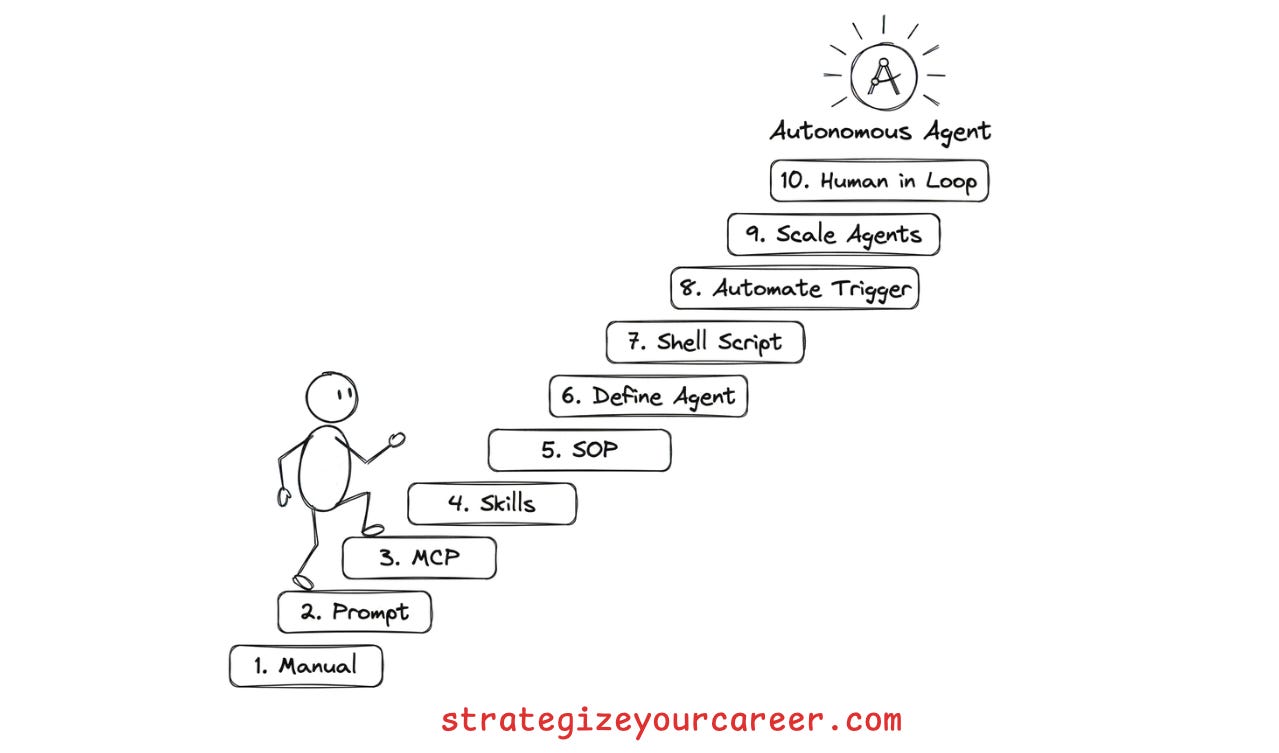
The process
The best way I found to do this process is to do the work multiple times. If you want to automate a particular type of ticket your team executes, ask your team to let you handle all those tickets for a while so you can develop the automation.
If you’re jumping too much between roles, you won’t have enough time and tickets to automate them properly. I warn you, the first steps you’ll spend 2x or 3x the time you’d spend if you did this manually, like you already know. But this is an automation that will run forever, including when you’re sleeping. It’s worth the cost
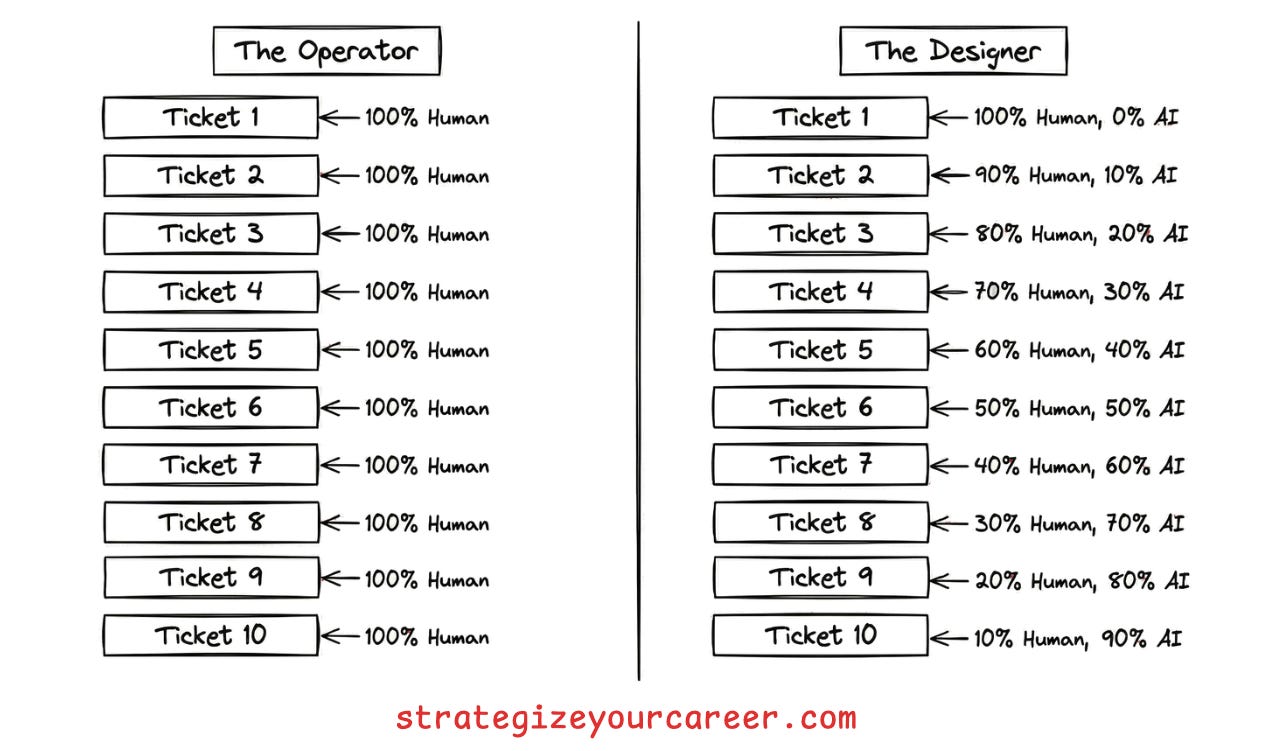
1. Learn the manual process first
You cannot automate what you cannot describe. This is the most common mistake engineers make. They try to build an agent for a task they do not fully understand themselves. The result is a flaky script that fails on most edge cases.
Do the task yourself without AI once. Write down every decision point. If you cannot write a checklist for it, the AI will fail. You need to identify the inputs, the decision logic, and the expected outputs. This manual pass reveals the hidden complexity that you usually handle on autopilot.
Of course, start with happy paths, don’t start with the most complex edge case for this kind of work. You can enrich the automation you’re building with edge cases later.
2. Solve it with manual AI prompts
Prove the concept before building the system. Once you understand the process, execute the task using manual prompts in your chat window. Do not try to build a complex agent yet. Just use your chat client.
Keep delivering work for your team, but refine the prompt with each ticket. You are identifying where the agent hallucinates or misses context, and updating your prompt for the next ticket. You will find that the agent often fails because it lacks information you thought was obvious. Refining the prompt manually allows you to fix these gaps quickly, and you’ll realize where AI by itself can’t solve the problem.
For my use case, the hardest part was about AI not being able to read, parse, understand and take action on complex JSON files. Also, I kept doing many manual work, posting comments in JIRA tickets, and moving between states in a kanban board.
3. Plug in MCP servers
Stop copy-pasting data between your browser and your IDE. The biggest friction point in manual prompting is context switching. You act as the glue between your ticket tracker, your code repository, and the LLM.
Connect MCP tools (the MCP standard) that allow the AI to take actions you were doing in the browser. You can use MCP servers to update JIRA tickets or comment on GitHub issues.
Now, all execution can happen inside your terminal or IDE. The agent can now fetch the ticket description directly. It can also post its findings back to the ticket without your help.
4. Create agent skills for repeated prompts
Don’t re-prompt the same context every time. After 2-3 iterations on tickets for the same kind of changes, you will notice that you are pasting the same instructions over and over. This is inefficient and error-prone. AI is great at planning but bad at reading ten thousand lines of logs.
I used to keep a prompt library with the prompts that I used for each kind of task. It was a good way to keep improving the prompt and have the benefits of iterations and a feedback loop. The problem was that again, I was the bottleneck, copy-pasting between one window and another.
Write specific skills (the skills.md standard) that allow the AI to do what the prompt describes. For the things that AI can’t do well enough by itself, create scripts to take complex, deterministic actions.. You do not need a fancy MCP tool for everything. A simple bash script wrapped as a skill works wonders. I used this to
In essence, a skill is
Something the AI learns to do.
It contains knowledge (markdown files), scripts to take actions (e.g. python or bash scripts), and resources or assets it can reference.
You can wrap MCP tools and scripts as skills. They enrich the MCP tool or script with context regarding how to use it. Even if the AI can execute commands in a terminal, it’s better to give it the building blocks with scripts than to let the AI generate those on every execution
My example with the JSON files:
ADD.py
FIND.py
REMOVE.py
My example of handling JIRA tickets:
SKILL.md and other markdown files -> Contains instructions to use JIRA MCP tools, regarding the status transitions in my workflows, regarding the projects and boards to use, etc.