How a productive engineer uses AI at work (18 practical tips)
Most engineers use AI randomly and stay slow. This article shows how to design AI-first workflows to eliminate busywork, learn just in time, and multiply impact (18 practical tips)
For the last week, I’ve been thinking about how to get more output per hour of work. More impact from the same effort.
I realized we are all clear that coding with AI in our IDE is a huge boost. We also know that AI does not replace judgment. It magnifies whatever judgment you already have. When the thinking is sloppy, AI makes mistakes faster. When the thinking is clear, AI compresses weeks of work into days.
But it’s not only about coding and IDEs. There are more things in our software engineering jobs besides writing code.
In this post, I cover all the ways I could think of for an engineer to become more productive in their day-to-day work. Let’s start!
In this post, you’ll learn
How to use AI to increase output without lowering quality
Where AI actually saves time in day-to-day engineering work
How to turn invisible work into visible career leverage
Why workflow design matters more than raw technical skill
Technical work. Ship faster while keeping high quality
Scaffolding and boilerplate generation
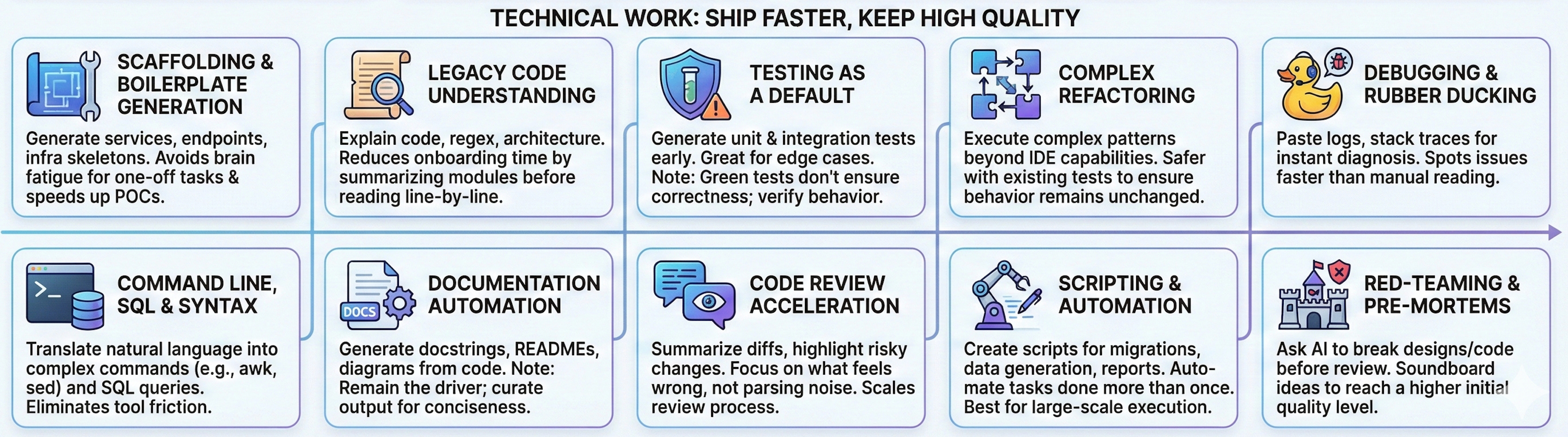
Generate services, endpoints, and infra skeletons to get a happy path running fast. This avoids the brain fatigue of having to search for the syntax of things specific to a framework and work that you’ll only do once.
It’s also useful to test an idea before committing more resources. A small session to build and try out a POC will prevent the frustration of throwing away weeks of work if the idea isn’t what leaders expected.Legacy code understanding and translation
Use AI to explain code, regexps or the architecture of a project. I have found it useful to reduce onboarding time by asking AI what a module does before reading it line by line.
Testing as a default, not a chore
Generate unit and integration tests early. AI is great at boring edge cases. The point of unit and integration tests is to make sure you can make changes later without worrying about breaking existing functionality. You’ll know if you break something unintended thanks to those tests.
Keep in mind AI will optimize to fulfill a goal, and if the goal is just to make tests pass, it may delete the tests or update the code’s behavior just to make tests pass. Green does not mean correct.Refactoring
I remember an “ahá” moment when I started using refactoring functionalities of IDEs. It was trivial to extract something into a constant, function, or class. It was safer to do it with the IDE’s built-in functionality than to do it myself.
The same with AI, but for more complex refactoring. AI can make the complex refactoring to follow certain design pattern that an IDE just can’t by itself. Keep in mind that you’ll benefit from tests to ensure the refactoring doesn’t change the behavior!Debugging and rubber ducking
Pasting logs, stack traces, and failing tests is much faster than reading them yourself. More than once, AI spotted the issue in a few seconds after I spent a few minutes reading the stack trace of trying to find the right log that indicates the issue.
Command line, SQL, and complex syntax generation
Translate intent from natural language into commands and queries. This removes friction from tools you use rarely but still need to get right. I’ll be honest, I don’t know how to pipe multiple terminal commands like
awkorsedand make them work properly, but AI usually nails the command that I need.
Also, new database client applications are emerging to use natural language to obtain the data you need and visualize it. You don’t need to subscribe to any fancy SaaS, just use IA to craft the SQL queries for you.Documentation automation
Generate docstrings, READMEs, and diagrams from code itself. With AI, there’s no excuse not to write a good readme for a project.
Something to keep in mind is that AI can be overly verbose, and that the order in which you prompt AI will change your output document. So make sure that you are still driving the AI, that you know what you want as an output, and just delegate the tedious part of writing or finding the right referencesCode review acceleration
Summarize diffs and highlight risky changes. This lets you focus on what feels wrong instead of parsing noise.
I just read a note from Franco Fernando last week about code being harder to review than to write. In his words: “Reading is so slow because you have to piece together the thought process in reverse, and that feels hard.”
Imagine you’re a famous podcast host. You’d have a team of researchers that provides you with a report for each guest, and you’d have that structure because it’s faster for you and it scales. The same when reviewing code. With AI, there’s more code written, and you don’t have the luxury to take your time to read 3 or 4 times the PR to understand its purpose.Scripting and automation
Create scripts for migrations, data generation, and reports. If you have done it twice, you should invest the time to automate it. For many things, AI is not good by itself. For example, if I have to generate synthetic data for 5 rows, I may use AI directly, but if I need to do it for a million rows, my only solution is for AI to write a script and run the script.
Red-teaming and pre-mortems
Ask AI to break your design before a reviewer does. In software security, red-teaming is about a team in your company trying to break your systems before a malicious hacker does. You can do that as well for all the code you write, and not only about security.
It’s good to use AI to soundboard ideas so the first output you show to others is at a higher level.
Office work. Eliminate undifferentiated work
Many of these AI usages aren’t specific to software engineers. We have to admit there is a lot of office work in our day-to-day, and we can reduce it.
Spec, RFC, and design doc drafting
Use AI to create a first pass and iterate on clarity. Many people fear the blank page. AI can help with creating that first draft.
It’s also important that you focus on the correctness of the technical solution you’re proposing. Let AI do the writing for you. Before AI, in some projects, I spent the same time on the technical work of creating a proposal as on writing it to clearly communicate it. Now the second part is a commodity.Tickets, planning, and agile ceremonies
Turn rough ideas into clear tickets with acceptance criteria. All agile ceremonies go faster when everyone leverages AI.
Before AI, a ticket would be better written or worse, depending on who wrote it. Now everyone can have the same level if you provide your team with some AI prompts and agents.Meeting summaries and action extraction
First, generate an easy way to retrieve the information discussed in a meeting, thanks to meeting notes. Also, generate decisions and next steps automatically, prompting an LLM with the meeting notes content.
This means a meeting doesn’t create more work to summarize it, send follow-up notes, etc. You can focus on alignment, making a decision, and taking action on that decision.Async communication polishing
Rewrite Slack and email messages for tone and clarity. I have avoided unnecessary back-and-forth by letting AI organize my ideas.
Especially in Slack, many people write top-down as ideas come to their mind. It’s like code, you iterate on the first line you wrote before committing. It helps to write non-trivial messages with AI (but don’t use AI for a 1-line Slack answer)Interviews, both sides of the table
Generate questions, find the different solutions, and compare them.
As a candidate, do mock interviews and understand the solutions you see in places like LeetCode.Reporting and promotion artifacts
Draft updates, metrics summaries, and feedback docs to others. In my experience, impact that is not written down might as well not exist.
This is the kind of work that we are all too lazy to do. It doesn’t add any value right now to collect your actions and their impact. If you’ve read my article about goal setting, it has a high delay, so we procrastinate it. We can increase the value by reducing the effort of taking this action with AI.
Zooming out and making better decisions
System design brainstorming
Explore multiple architectures and trade-offs quickly. AI helps you discard weak ideas early, not lock into one too soon.
Before AI, I saw how I’d go deep into one alternative, and then I’d find myself trying to justify why choosing that alternative was a good idea, just because I had committed a lot of time to it (sunk cost fallacy). That’s why with AI, you can avoid this bias, because you don’t need to dedicate a huge amount of time to understand the tradeoff.
Learning and upskilling on demand
Use AI to explain new concepts through systems you already understand. This is not only about faster reading. It is better timing.
Most engineers learn “just-in-case”. You read about patterns, tools, and architectures, hoping they will be useful someday. Without immediate application, you forget about what you’ve read.
With AI, you can have “just-in-time” learning. You learn at the exact moment a real problem demands it. You already have context, constraints, and motivation. The knowledge sticks because it is used immediately.
In the past, you had to know what to look for. If you did not know a design pattern existed, you could not search for it. That forced us into broad learning.
Now you can prompt AI with the problem. Describe the constraints, the trade-offs, and what feels painful. AI can surface relevant patterns, approaches, or concepts you did not know by name.
Conclusion
AI won’t do your job by itself. But leveraging AI will save you tons of hours.
Do not skip the thinking part; skip the friction. AI-first does not mean careless; it means intentional because you remove undifferentiated work.
These are just my thoughts based on the work I do day-to-day. I’m curious about what ways you’re using AI at work. Let me know in the comments!
This is an article inside our system to move from phase 1 to phase 2: Save time. Do your existing work faster thanks to AI and free your time for the really important work.
I’m building this system for paid subscribers. Thanks for your continued support!
🗞️ Other articles people like
👏 Weekly applause
Here are some articles I’ve read last week and liked:
Design Stock Exchange - A Deep Dive by Neo Kim . An actionable article for building high-throughput systems.
Happy Teams Build Better Products by Raul Junco . Clear context and energy-aware workflows are what define high-performing teams.
Mastering Communication (Part 1 of 4) by Sidwyn Koh . Communication should be value-driven. Good communication accelerates decisions.
P.S. This may interest you:
Are you in doubt whether the paid version of the newsletter is for you? Discover the benefits here
Could you take one minute to answer a quick, anonymous survey to make me improve this newsletter? Take the survey here
Are you a brand looking to advertise to engaged engineers and leaders? Book your slot now
Give a like ❤️ to this post if you found it useful, and share it with a friend to get referral rewards
The fancy images are AI-generated, the ones that aren’t fancy are likely done by myself :)