Is ChatGPT becoming a commodity? A software engineer's buyer's guide to AI tools
Overwhelmed by AI subscriptions? Master a cost-effective framework: avoid annual plans, prioritize workflow, and use API keys to maximize developer ROI.
The AI landscape for software engineers is overwhelming nowadays. Every week brings a new benchmark winner. Keeping up with these releases feels like a full-time job. You might feel the need to manage five different subscriptions just to stay relevant in the industry.
There are two kinds of markets, and the research will determine which one AI is in the end:
In a winner-takes-all market. The gap between the best tool and the second-best tool is usually massive. This means you always want to be with the best player available.
Commodity market: The cheapest one that does the job wins. For example, electricity. You don’t care where it came from and who obtained it; the value is the same.
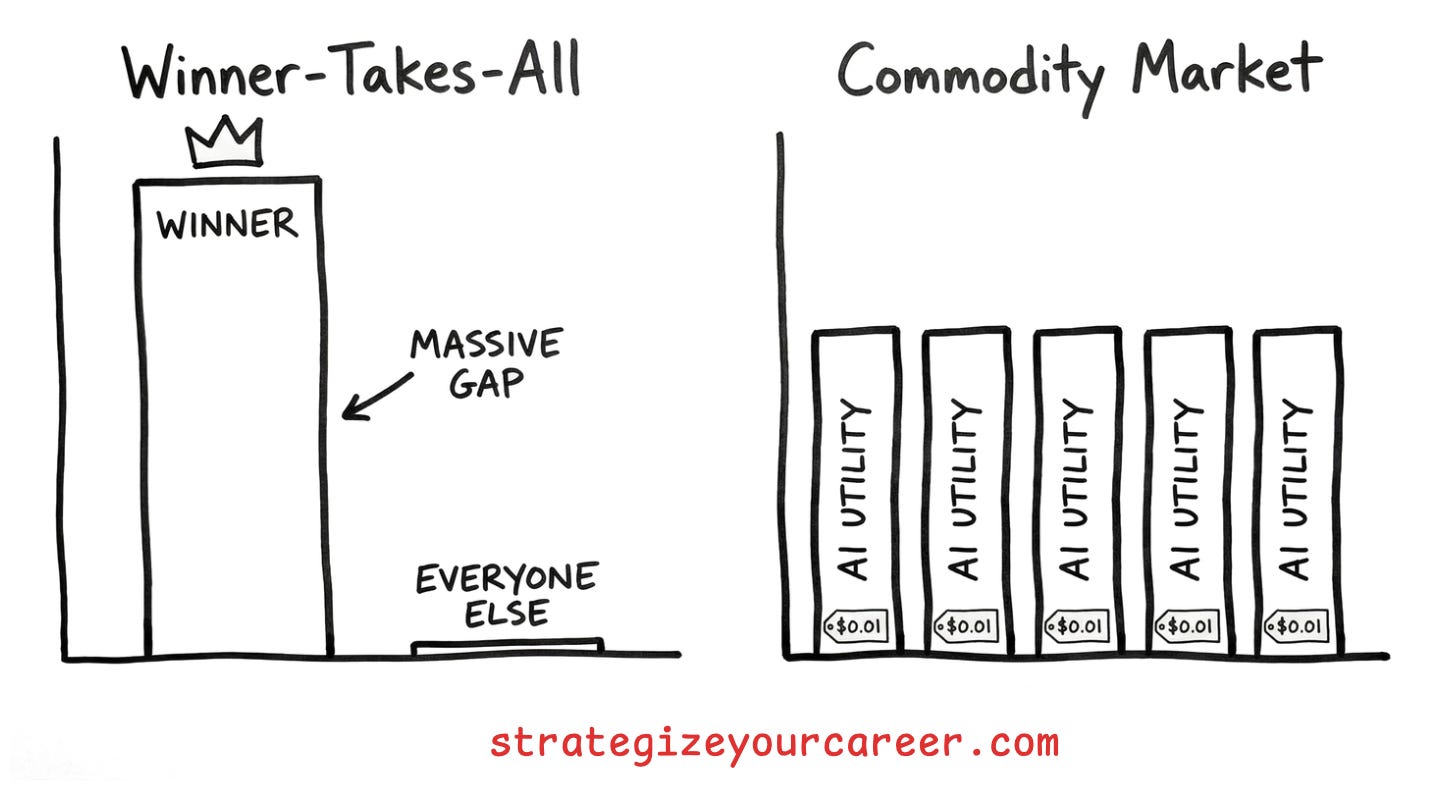
Because the market moves so fast, the best player often changes every six months. AI was behaving like a winner-takes-all where ChatGPT was king, but if all big players keep having these similar results, it will become a commodity like it’s happened in the last year.
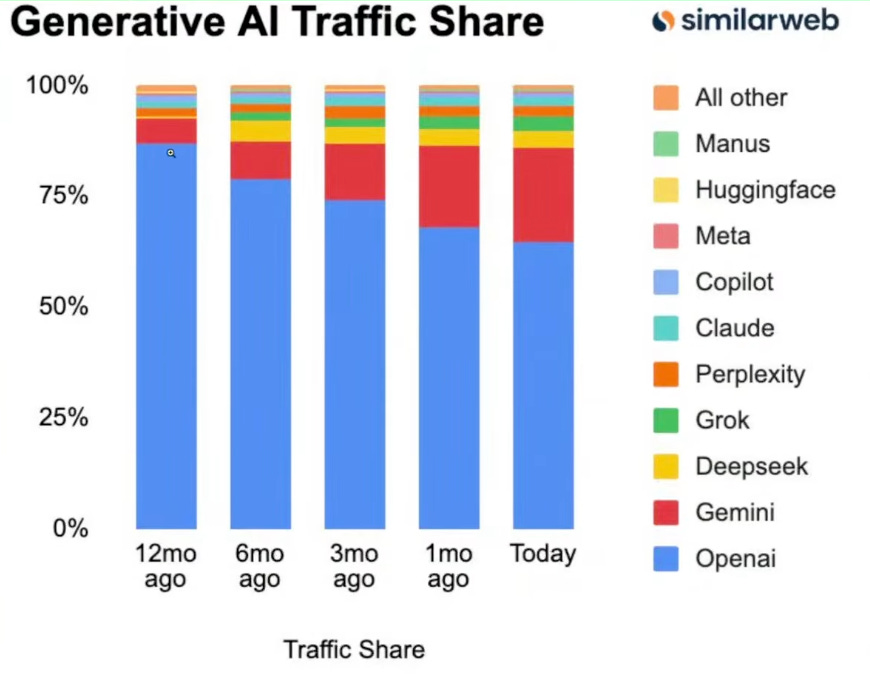
This guide is not about which specific tool you should buy today. It provides a framework for how to buy them to maximize your return on investment. You can avoid subscription fatigue while staying at the top of your professional game.
In this post, you’ll learn
How to manage subscriptions in a fast-moving market.
Something that matters more than benchmarks.
Strategies to treat AI tools as professional costs instead of entertainment costs.
The benefits of using your own API keys
The golden shopping rules for AI tools
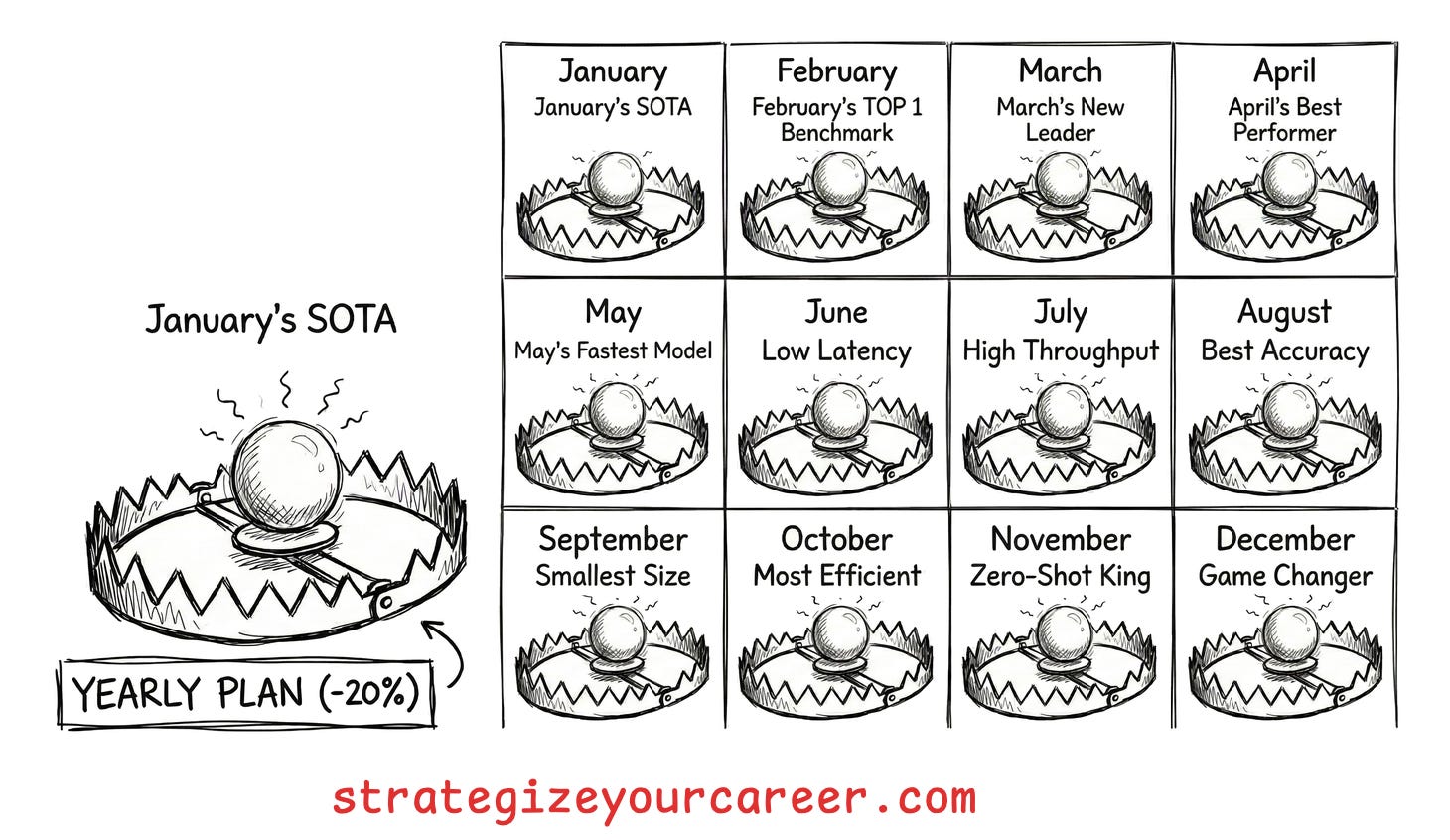
Rule #1: The “No-Annual” AI Plans
Never commit to a yearly subscription for an AI tool, even if the company offers a twenty percent discount. Software moves too fast for long-term pricing plans to make sense for individuals. If a tool rises fast, it can fall just as quickly. Flexibility is king in this environment. You must retain the ability to jump to a new tool.
Rule #2: Workflow > Benchmarks
Do not switch tools just because a company releases a new model with slightly higher numbers on a leaderboard. Ignore the PR hype from companies (and from people on social media). You should prioritize the user/developer experience over benchmarks.
A model can have a better score in a benchmark for two reasons
The model is really more intelligent
The benchmark is saturated. New models are trained in similar problems, and the benchmark is not a good measure of a model’s intelligence anymore
Using Cursor with an older model will likely be superior to pasting code into a smarter web-based chat. The deep integration with your IDE saves more time than a slightly smarter model.
And even if a web-based model is truly better, you can use it to create a plan and then move back to your AI-powered editor. Do not break a workflow that works for you just to try the new hype. I tried Raycast only to realize I prefer the workflow I already have in Alfred; the effort of switching wasn’t worth the potential incremental gain.
Avoid the shiny object syndrome
Rule #3: Beware of “Model Wrappers”
If a tool only provides a pretty interface on top of GPT-5 or Opus 4.5, be careful committing to pay for it. It carries a high risk of being replaced by the model providers in a few months. OpenAI or Anthropic will eventually build those interfaces themselves, like they are already doing with Claude Cowork (and soon a replacement for Clawdbot/Moltbot/OpenClaw).
You should only pay for tools that offer deep value and specialized features, even at the risk of big providers offering them in the future.
Smart budgeting for productive engineers
Don’t classify it as a miscellaneous cost
Stop viewing your $20 AI subscription a month as an entertainment cost like a Netflix subscription. You should shift your mindset and view it as a professional cost.
This is a utility that helps you do your job. If you pay from your pocket for using it outside your job, think about it as a learning resource. You can often learn more from five hours of prompting a state-of-the-art model than from five hours of reading a technical book.
You should use income from your main job or side projects to fund these tools in your personal life. A few years ago, most of us did not have a budget for AI tools. Now, everyone should have a section in their budget for these utilities and decide what is reasonable for them to pay.
Define budgets for projects
Niche tools should be treated as temporary expenses for specific needs. If you need a video generator or an infographic maker for one task, subscribe only for the duration of that project. Cancel the subscription immediately after you ship the project. Do not let zombie subscriptions eat your monthly budget “just in case” you need them. You can often lean on generalist models like Gemini for most jobs. This prevents you from needing a separate subscription for every single task. Only pay for specialized tools when a generalist model is not good enough for your specific requirement.
Define what’s reasonable for you to pay
Not everybody has an iPhone. I used budget Xiaomi phones for most of my life. Instead of purchasing “the best“, purchase the one that’s “right for you“
You should always look for ways to reduce your costs through deals and tiers. Check if you are eligible for student emails or startup credits. If you are not using the full power of a pro plan, look for cheaper versions that offer just enough for your actual usage. Some services offer lite plans that increase your limits without the full cost of their premium subscription. This allows you to scale your spending based on your actual needs. You should regularly audit your subscriptions to see which ones still provide value.
Pay as you go > Subscriptions
At least for those of you who don’t have much time outside of work to play with AI.
Prioritize tools that allow you to bring your own key or purchase a certain amount of credits. This lets you pay for your actual usage instead of a flat monthly fee. For personal tools, look for interfaces that let you plug in an API key from providers like OpenAI or Anthropic. This approach is often much cheaper for developers who do not use the tool every single day. If you go on vacation or have a week where you don’t use it, your cost drops to zero dollars. You are not paying for a service you are not using.
Using your own API key also gives you access to the real model experience. Some web chat subscriptions might use downgraded models during periods of high traffic. When you use an API, you generally get the full performance of the model. This makes sure that your technical work is not hindered by service limits or hidden performance drops. You can switch between different models easily without signing up for a new subscription. This gives you the ultimate flexibility to use the best model for each specific task.
Managing your own keys requires a bit more setup, but the benefits are worth the effort, unless you’re the power-user who really benefits from a subscription. With BYOK, you can set usage limits on the provider side to make sure you never go over your budget. This technical approach aligns with the way engineers should think about their tools. You are building a custom stack that fits your specific workflow. It turns your AI usage into a transparent and controllable part of your development process.
Conclusion
The goal is to be the most productive engineer both at work and in your personal life. You do not need the highest number of subscriptions to achieve this. Only switch when there’s a clear new winner and when it will benefit your workflow
For your development environment, pay for the one that makes you ship code faster. It does not matter which model is underneath if the workflow saves you time. If you need a niche tool for a specific task, rent it for a week and then fire it. Do not let these tools become a permanent part of your monthly expenses.
You should spend your money where it directly saves you time and effort. Being productive doesn’t need more work. It also means understanding how to do your taxes and doing them in half the time, so you can go to the cinema on the weekend.
Your budget is finite, but your potential productivity is not.
If you found value in this post:
❤️ Click the heart to help others find it.
✉️ Subscribe to get the next one in your inbox.
💬 Leave a comment with your biggest takeaway
This is an article inside our system between phases 1 and 2. You’ll do your job faster with AI tools, freeing up the time to do the important things that drive your career forward.
I’m building this system for paid subscribers. Thanks for your continued support!
🗞️ Other articles people like
👏 Weekly Applause
The creator of Clawd: “I ship code I don’t read” by The Pragmatic Engineer. The “hand-coded” era is evolving into an AI-native workflow. I like the idea of the author of Clawdbot about focusing on the architecture instead of the syntax, but for production-ready software, we need more of a CI/CD pipeline than sending code you don’t even read.
Authentication Fundamentals: Part I by Franco Fernando. Security isn’t the place for guesswork. You need a good understanding of the different techniques for anything, like authentication
P.S. This may interest you:
Are you in doubt whether the paid version of the newsletter is for you? Discover the benefits here
Could you take one minute to answer a quick, anonymous survey to make me improve this newsletter? Take the survey here
Are you a brand looking to advertise to engaged engineers and leaders? Book your slot now
Give a like ❤️ to this post if you found it useful, and share it with a friend to get referral rewards
The fancy images are likely AI-generated, the not-so-fancy ones by me :)